
Profit and loss statement: a small business example and free template

A profit and loss statement, or P&L, shows what your business earned, what it spent and what was left over during a period, such as a month or a year. It's also called an income statement¹. The math: income minus cost of goods sold (what the products you sold cost you) minus expenses equals net profit. A small candle business that sells online and to shops had $80,242.04 in sales, $45,840.30 in costs and expenses, and a net profit of $34,401.74 for the year.
We build Booke AI, AI bookkeeping software for QuickBooks Online and Xero. Download the free profit and loss template (Excel): a monthly sheet with the formulas built in, plus the candle business's year filled in as an example.
Profit and loss statement example
Here is that candle business's P&L for October 1, 2025 to September 30, 2026. It's on a cash basis: sales count when customers pay, and expenses count when the business pays them.
Amount | % of income | |
|---|---|---|
Income | ||
Online sales | $57,412.03 | 71.5% |
Wholesale to shops | $22,830.01 | 28.5% |
Total income | $80,242.04 | 100% |
Cost of goods sold | ||
Materials (wax, jars, wicks) | $12,928.40 | 16.1% |
Gross profit | $67,313.64 | 83.9% |
Expenses | ||
Wages (part-time packer) | $9,494.63 | 11.8% |
Shipping and packaging | $7,767.63 | 9.7% |
Advertising | $3,900.00 | 4.9% |
Payment processing fees | $2,198.21 | 2.7% |
Software and subscriptions | $2,078.16 | 2.6% |
Loan and card interest | $2,076.22 | 2.6% |
Accountant | $1,800.00 | 2.2% |
Insurance | $1,302.00 | 1.6% |
Internet | $1,068.00 | 1.3% |
Bank fees | $448.00 | 0.6% |
Payroll service | $434.00 | 0.5% |
Office supplies | $345.05 | 0.4% |
Total expenses | $32,911.90 | 41.0% |
Net profit | $34,401.74 | 42.9% |
Some lines are a judgment call. The packer's wages or the shipping could go in cost of goods sold instead of expenses. That changes gross profit but not net profit. Whatever you choose, keep it the same from month to month so the periods compare.
How to read a profit and loss statement
Check the dates and the basis, cash or accrual. On a cash basis an unpaid invoice isn't income yet; on an accrual basis it is².
Read income. Online sales brought in 71.5% of the candle business's income and wholesale the rest.
Read gross profit, which is income minus cost of goods sold. Here it's $67,313.64, or 83.9% of income. That percentage is the gross margin. When it slips, a price or a cost has moved: the candle business paid $689 for its monthly wax order of ten 50-pound cases in October and $799 for the same order by June, 16% more.
Read expenses, biggest first. Wages and shipping lead. Shipping and packaging alone take 9.7% of income, so a carrier rate increase shows up on this line.
Read net profit last: $34,401.74, or 42.9% of income, which is the net profit margin.
Net profit isn't what the owner was paid. The owner took $32,400 out of the business during the year, including $8,400 for estimated income tax. Owner's draws aren't expenses, so they don't appear on the P&L³. To decide how much to take, see how to pay yourself from an LLC.
Read it month by month
The candle business's profit swung with the seasons. From October to December it made $18,135.53, 52.7% of the year's profit, and in April it made $304.08.
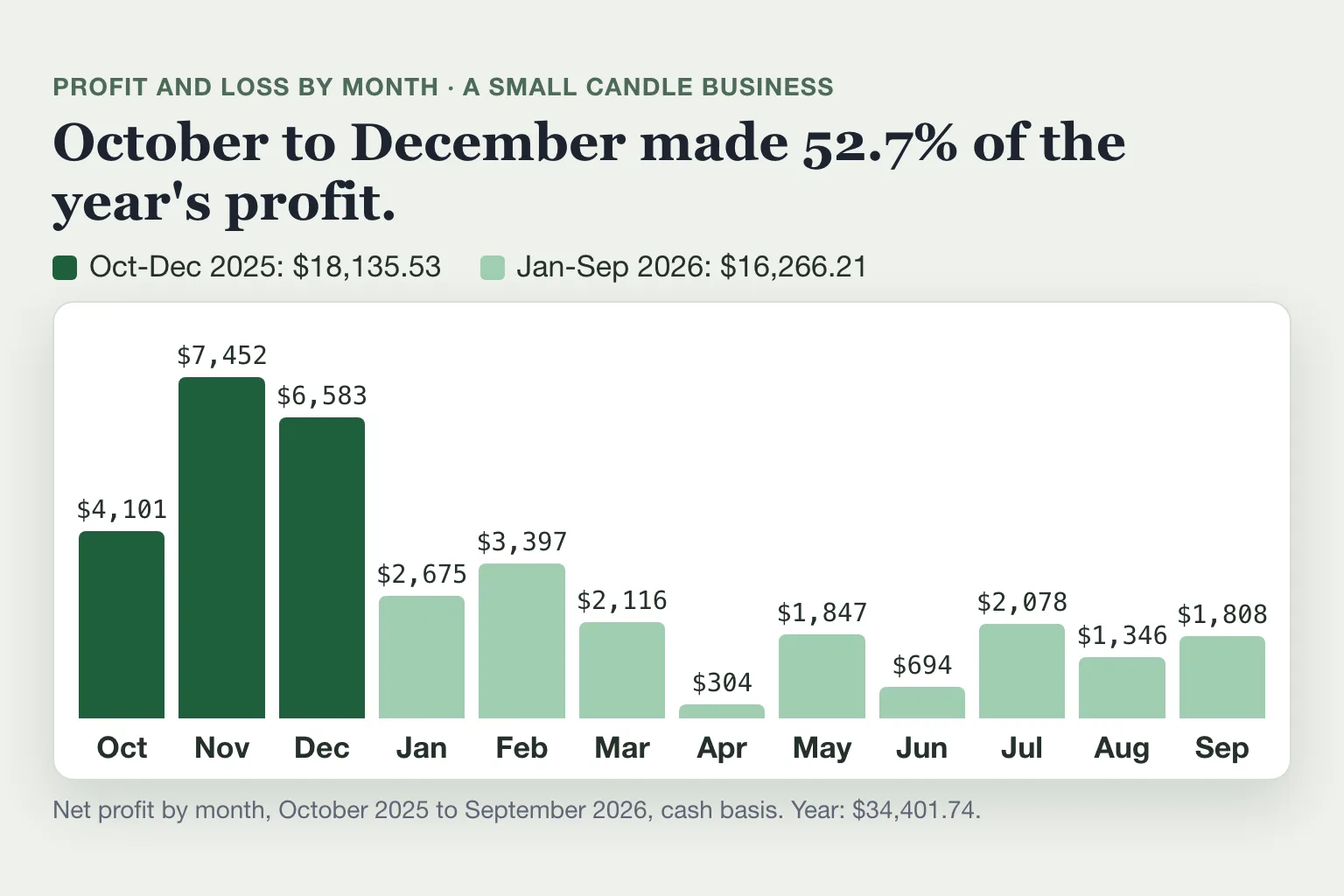
In QuickBooks Online, the Profit and Loss by Month report shows this view⁴. In Xero, choose the "Current fiscal year by month" format².
What doesn't go on a profit and loss statement
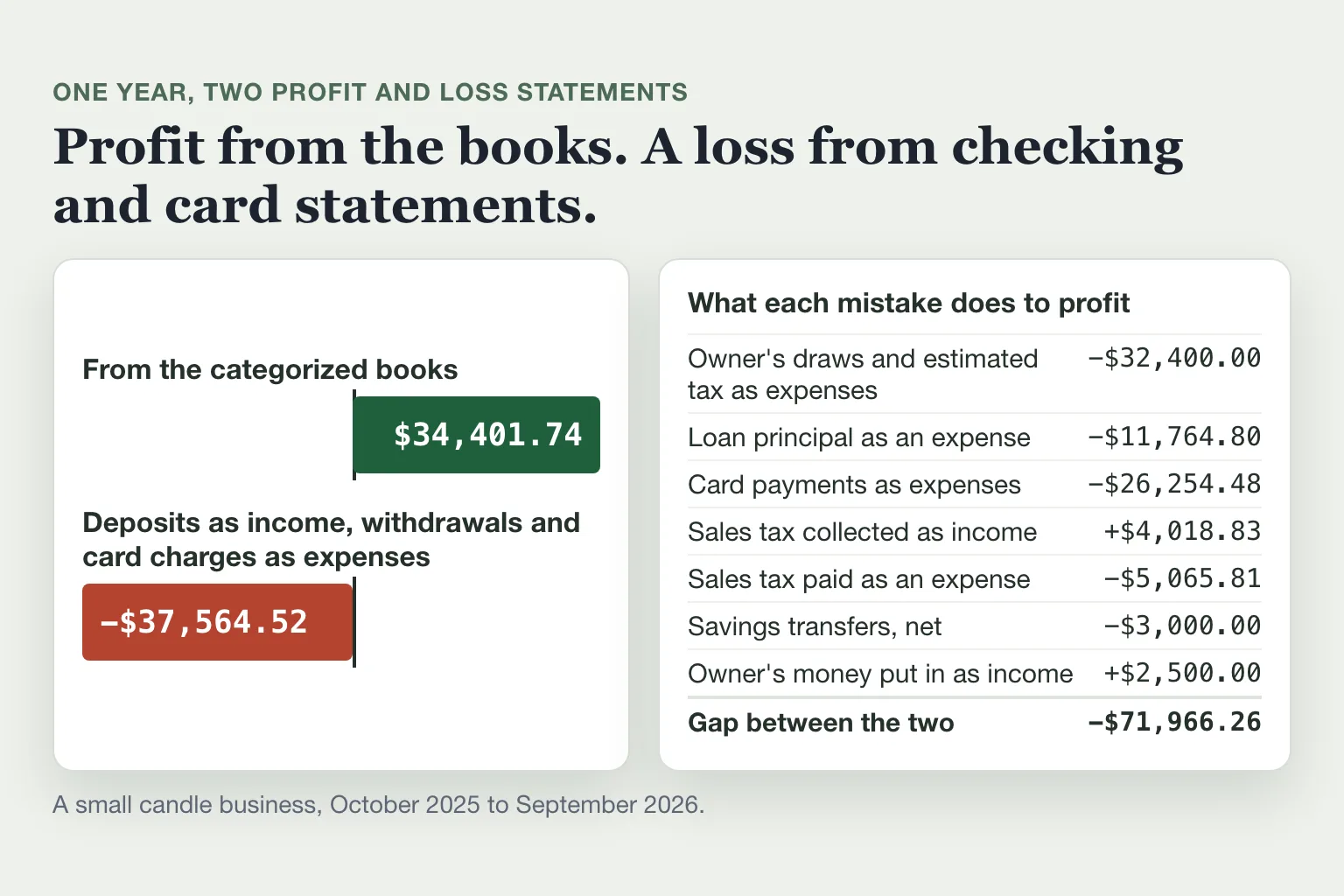
A P&L holds only income and expenses. A lot of money moves through a business account that is neither. It belongs on the balance sheet instead, which shows what the business owns, what it owes and the difference between the two, called equity⁵. The table shows what each kind of money does to the candle business's $34,401.74 when it's booked as income or an expense.
Booked by mistake | Where it belongs | Net profit with only this mistake |
|---|---|---|
Owner's draws and the owner's estimated tax, $32,400, as expenses | Owner's draw, an equity account³ | $2,001.74 |
Full loan payments as expenses, including $11,764.80 of principal | The loan balance; only the interest is an expense⁶ | $22,636.94 |
Card payments from checking, $26,254.48, as expenses on top of the card purchases | A payment on the card balance⁷ | $8,147.26 |
Sales tax collected, $4,018.83, as sales | Sales tax you owe the state⁸ | $38,420.57 |
Sales tax paid, $5,065.81, as an expense | Sales tax you owe the state⁸ | $29,335.93 |
$6,000 moved to savings as expenses, $3,000 moved back as income | A transfer between your own accounts⁹ | $31,401.74 |
$2,500 the owner put in as income | Owner's contribution, an equity account¹⁰ | $36,901.74 |
Make all seven mistakes and the same year shows a loss of $37,564.52 instead of a $34,401.74 profit. That's the P&L you get by adding up checking and card statements: every deposit as income, every withdrawal and card charge as an expense.
How to make a profit and loss statement
Pick the period, such as a month, a quarter, the year to date or a full year. Pick cash or accrual and keep it.
Gather the records for that period: bank and card statements, invoices, bills and receipts.
Add up income by type, such as online sales and wholesale. Subtract refunds.
Add up cost of goods sold, what you spent on the products or services you sold. Income minus cost of goods sold is gross profit.
Add up expenses by category. Gross profit minus expenses is net profit.
Check what you left out. Every deposit and withdrawal should either be on the P&L or be one of the kinds of money in the table above. Two more stay off: loan money you receive and equipment you'll use for years, which usually reaches the P&L over time as depreciation¹¹.
The free profit and loss template, which you can also use as an income statement template, does the adding for you. It has twelve month columns and a total, so the same sheet works for one month, the year to date or a full year. Most expense rows follow the order of Schedule C, the IRS form a sole proprietor files¹², which makes the numbers easy to carry to a tax return or a lender's form.
If you keep your books in QuickBooks Online or Xero, you don't build the P&L by hand. The software builds it from your categorized transactions.
How to run a profit and loss report in QuickBooks Online and Xero
In QuickBooks Online¹³:
Go to Reports, then Standard reports.
Find Profit and Loss in the list, or search for it with Find report by name.
Set the Report period and choose Cash or Accrual as the Accounting method.
To keep a copy, select Export/Print, then Export to Excel¹⁴.
Profit and Loss by Month is included on Solopreneur, Simple Start, Essentials, Plus and Advanced. Free and Lite have the regular Profit and Loss report but not the by-month version⁴. The Profit and Loss Comparison report sets this year to date against the same period last year by default¹³.
In Xero, the US version of the report is called Income Statement (Profit and Loss)²:
In the Reporting menu, select All reports.
Open Income Statement (Profit and Loss).
Set the Date range. To switch between cash and accrual, select More.
Select Update to run the report.
Profit and loss statement for self-employed owners
Self-employed owners are often asked for a P&L when they apply for a mortgage or a business loan. Fannie Mae's mortgage rules let a lender use a P&L, audited or unaudited, to check that a self-employed borrower's income is stable¹⁵. A year-to-date P&L isn't required for most businesses. The lender may ask for one when the application is dated more than 120 days after the business's tax year ended¹⁵. For a business on the calendar year, that's an application dated after April 30.
A year-to-date P&L runs from the first day of your tax year to a recent date, such as January 1 to October 31. In QuickBooks Online or Xero, set the report dates that way. In the template, fill only the months so far.
Fannie Mae says a typical P&L looks like Schedule C¹⁵, the form sole proprietors file. So does the owner of a single-member LLC, unless the LLC has chosen to be taxed as a corporation¹⁶. Business lenders set their own dates. The SBA's 504 loan application, for example, asks for an income statement dated within 120 days of submission¹⁷. Ask your lender which period, which basis (cash or accrual) and which form it wants before you start.
Why your profit and loss statement can be wrong
In QuickBooks Online, bank and card transactions wait in the For review tab, and they "won't affect your books until you match or categorize them"¹⁸. A P&L run before that review leaves them out. Transactions added in a hurry often land in Uncategorized Income, Uncategorized Expense or the wrong account, and the P&L adds them up anyway.
Before you send a P&L to a lender or your accountant, check that:
nothing for the period is still waiting in For review;
there's no Uncategorized Income, Uncategorized Expense or Ask My Accountant line;
no expense line is a transfer, a card payment, a full loan payment, a sales tax payment, money you took out or equipment you'll use for years;
no income line holds loan money, money you put in, transfers between your accounts or sales tax;
your bank and card accounts are reconciled to their statements.
Where Booke fits
Every day Booke goes through your bank transactions in QuickBooks Online or Xero, sorts them into categories and matches receipts, adds the ones it's sure about to your books and asks you about the rest. It works with the bank feeds already connected there, so you don't connect your bank again.
Booke automates up to 80% of the manual bank-feed work for $129 a month per business. See how Booke works for small business owners.
FAQ
What is the formula for a profit and loss statement?
Income minus cost of goods sold is gross profit. Gross profit minus expenses is net profit. For the candle business: $80,242.04 minus $12,928.40 is $67,313.64, and $67,313.64 minus $32,911.90 is $34,401.74.
Is a profit and loss statement the same as an income statement?
Yes, they're two names for the same report¹, so a P&L template and an income statement template are the same sheet. QuickBooks Online calls it Profit and Loss, and Xero's US version calls it Income Statement (Profit and Loss)².
Does a sole proprietor need a profit and loss statement?
Not for the IRS: Schedule C, which a sole proprietor files each year, is in effect a P&L for the business¹⁶. A mortgage or business lender may still ask for a separate one, such as a year-to-date P&L¹⁵.
How often should I run a profit and loss statement?
Xero recommends at least once a month¹. A monthly P&L also catches a miscategorized line while you still remember what it was.
Can I make a profit and loss statement for free?
Yes. Use the template above, or run the report in QuickBooks Online: even the Free plan includes the Profit and Loss report⁴.
Sources
Xero, How to read a profit & loss statement, July 2, 2026.
Xero Central, Income Statement (Profit and Loss) report, retrieved November 13, 2026.
Intuit, Set up and pay an owner's draw, updated August 5, 2026.
Intuit, Reports included in your QuickBooks Online subscription, updated August 10, 2026.
Intuit, Run a Balance Sheet report, updated August 5, 2026.
Intuit, Set up a loan in QuickBooks Online, updated August 5, 2026.
Intuit, Record your payments to credit cards in QuickBooks Online, updated August 5, 2026.
Intuit, File your sales tax return and record sales tax payments in QuickBooks Online, updated September 15, 2026.
Intuit, Transfer funds between accounts, updated August 3, 2026.
Intuit, Record an owner's contribution or capital investment in your business in QuickBooks Online, updated August 5, 2026.
IRS, Publication 946, How To Depreciate Property, 2025.
IRS, Schedule C (Form 1040), Profit or Loss From Business, 2026 form.
Intuit, Run a profit and loss comparison report in QuickBooks, updated August 4, 2026.
Intuit, Export reports to Excel, updated August 4, 2026.
Fannie Mae, Selling Guide B3-3.7-04, Analyzing Profit and Loss Statements, retrieved November 13, 2026.
IRS, Instructions for Schedule C (Form 1040), 2025, page reviewed April 30, 2026.
SBA, Form 1244, Application for Section 504 Loans, revised December 2021.
Intuit, Match your bank and credit card transactions, updated August 14, 2026.

